GPW Imager.See your stereo.
A free stereo field processor built like rack hardware. SIMPLE gives you width, rotation and a shuffler in six knobs; MULTIBAND gives every band its own width. Scroll to explore both views.
Width, band by band.
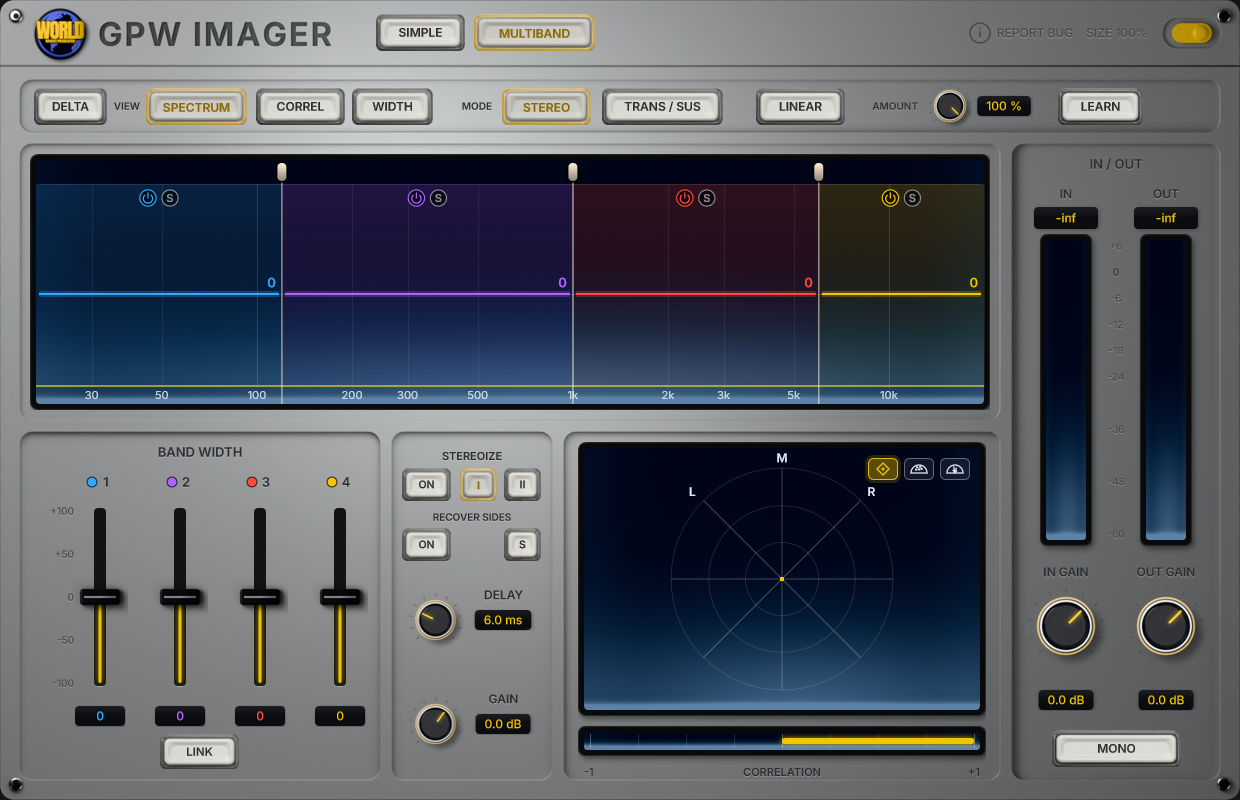
The MULTIBAND tab gives you adjustable crossovers and independent width for each band, so you can keep the low end tight while the highs open up.
Up to four
Drag the crossovers anywhere from 20 Hz to 20 kHz, add or remove bands, bypass or solo any of them. Analog crossovers, or linear-phase when phase matters.
Per band
From mono to twice the side on every band, with faders you can link. Drag a band up or down right on the display.
Width from mono
Stereoize I and II (1–20 ms) widen mono sources; Recover Sides brings back what narrowing took away.
Attacks vs tails
Transient/Sustain mode gives attacks and tails their own band widths: tight punch, wide decay.
Crossovers from your audio
Press LEARN, play the part, and the crossovers settle where your mix actually splits.
Delta and mono
Delta plays only what the imager changes; Mono checks the fold-down. Amount blends the whole effect.
Three views
See the spectrum, the correlation or the width of each band, with the vectorscope and correlation meter alongside.
In and out
Input and output meters with their own gain, so the comparison is always at matched loudness.
Glass puck controls
Glass puck knobs sit on the rendered metal plate. Shift for fine moves, double-click to reset.
Three ways to look
Lissajous goniometer, polar sample and polar level. Anti-phase content folds to the horizon so you spot it at a glance.
Click-free bypass
The illuminated power switch bypasses processing with a click-free crossfade, so comparing before and after never pops.
Updates in one click
The plugin tells you when a new version is out and updates itself. Resize from 50 to 150 %; right-click any control for automation.
The SIMPLE tabSix knobs. Total control.
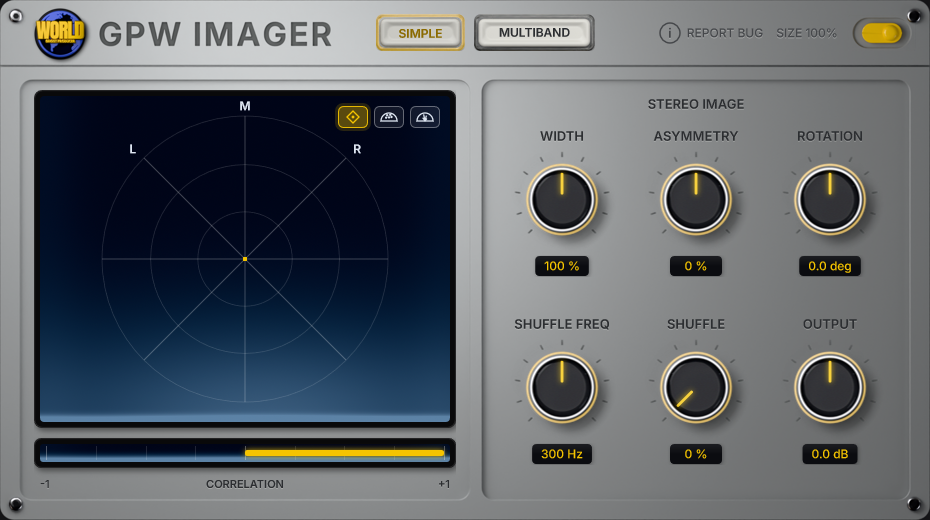
The SIMPLE tab works in mid/side, so the centre of your mix stays put while the sides open up. Every move shows up on the vectorscope the moment you make it, and the correlation meter warns you before width turns into phase trouble.
- 0 – 200 %
Width
Scales the side signal. 0% folds the mix to mono, 200% pushes it twice as wide.
- ±100 %
Asymmetry
Bleeds a little of the mid into the side, nudging the centre image left or right.
- ±45°
Rotation
Rotates the whole stereo image in the mid/side plane, like turning the mix on its axis.
- 40 Hz – 2 kHz
Shuffle Freq
Sets the crossover for the shuffler. Everything below it gets the extra width.
- 0 – 100 %
Shuffle
A Blumlein-style shuffler: adds up to +6 dB of side below the crossover for wider lows and low mids.
- ±12 dB
Output
Output trim, so a wider image does not trick you into thinking it is better just because it is louder.
GPW Imager FAQ
Straight answers about what the plugin does and how to use it.
What is GPW Imager?
GPW Imager is a stereo field processor plugin (VST3, Windows) made by Ghost Producer World. It has two tabs. SIMPLE works on the whole mix in mid/side: Width from 0 % (mono) to 200 %, Asymmetry, Rotation up to ±45°, a Blumlein-style shuffler below a crossover from 40 Hz to 2 kHz, and Output trim. MULTIBAND splits the signal into up to four bands, each with its own width.
What does the MULTIBAND tab do?
It splits the signal into up to four bands with crossovers you drag anywhere from 20 Hz to 20 kHz, analog or linear-phase. Each band gets its own width (from mono to twice the side), bypass and solo. On top there are Stereoize I and II to widen mono sources, Recover Sides to bring back what narrowing removed, a Transient/Sustain mode with separate widths for attacks and tails, LEARN to place the crossovers from your audio, Amount, Delta and Mono listen, and input/output gain with meters.
What does the vectorscope show?
Three views: a Lissajous goniometer with mono on the vertical axis and hard left and right on the diagonals; a polar sample view that places each sample on a half circle by stereo position and level; and a polar level view that draws the energy in each direction as rays. A backlit correlation meter runs from −1 (out of phase) to +1 (mono). The multiband band display can also show the spectrum, correlation or width per band.
How do I check that a wide mix still works in mono?
Watch the correlation meter: yellow right of centre means the channels agree; red left of centre means they cancel when summed to mono. Lower Width or Shuffle until the meter stays on the yellow side, and use the power switch (or Mono listen in the multiband tab) to compare.
Does GPW Imager add latency?
The SIMPLE tab and the multiband tab with analog crossovers add zero latency. Linear-phase crossovers add a fixed 128 ms, which GPW Imager reports to your DAW so everything stays in time. The latency never changes while you move a crossover, so the DAW never has to re-sync.
Which plugin format does it use, and how do updates work?
VST3 for Windows, stereo in and stereo out, in any DAW that hosts VST3 plugins. The plugin checks for new versions and updates in one click from its header. The interface resizes from 50 to 150 %, and right-clicking a control opens your DAW's automation menu.
Is GPW Imager free?
Yes. GPW Imager is a free download for Windows (VST3). Enter your email on this page and the download starts right away; new versions arrive through the plugin itself. A macOS version is coming soon.
GPW Imager is out.
Free. Enter your email and the download starts right away.